
Design inspired by
growth, clarity, and innovation
Helping ideas grow through thoughtful, user-centered design.
Product Design · UX / UI · Visual Identity · Front-End
Creative portfolio by JennyStudios

Hi, I’m Jenny!
Lifelong learner, designer, and storyteller
I’m a Sydney-based designer and writer exploring the intersection of design, front-end development, and education. My work focuses on creating digital experiences that feel intuitive and human — combining creativity, technical precision, and purpose to communicate ideas clearly.
I’m particularly interested in how visual design and code come together to enhance accessibility and understanding. My portfolio reflects versatility, curiosity, and a dedication to continual growth in an evolving digital landscape..
What I Do
DESIGN
- Brand Identity
- Product and Marketing Design
- UI/UX Prototyping
DEVELOPMENT
- Front-End
- CMS
- Web & Interactive Design
The projects below showcase my multidisciplinary approach across UI/UX design, web development, educational technology, and marketing. The goal of my work is to blend creativity and collaboration to design experiences that connect with people, communicate ideas clearly, and feel intuitive to use.
TOOLKIT
Adobe Creative Suite
Figma





Creative Marketing and Design
Marketing Lead – Student Organisation
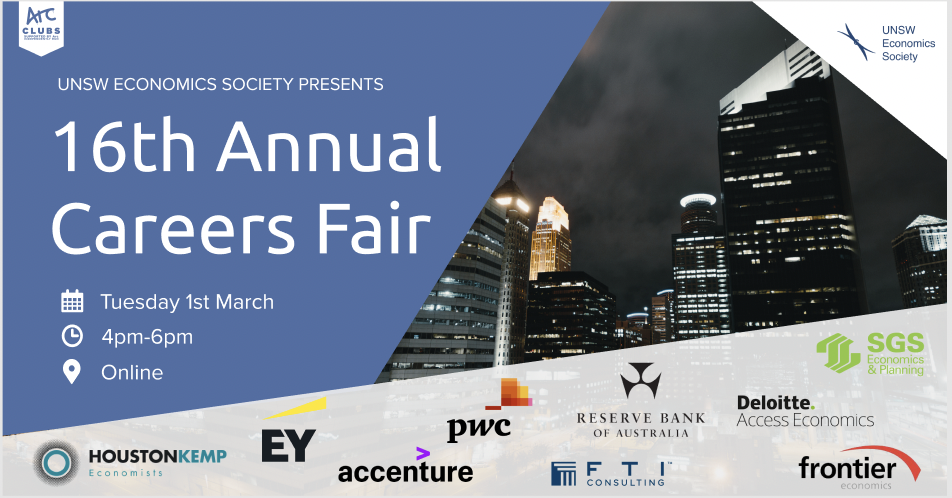
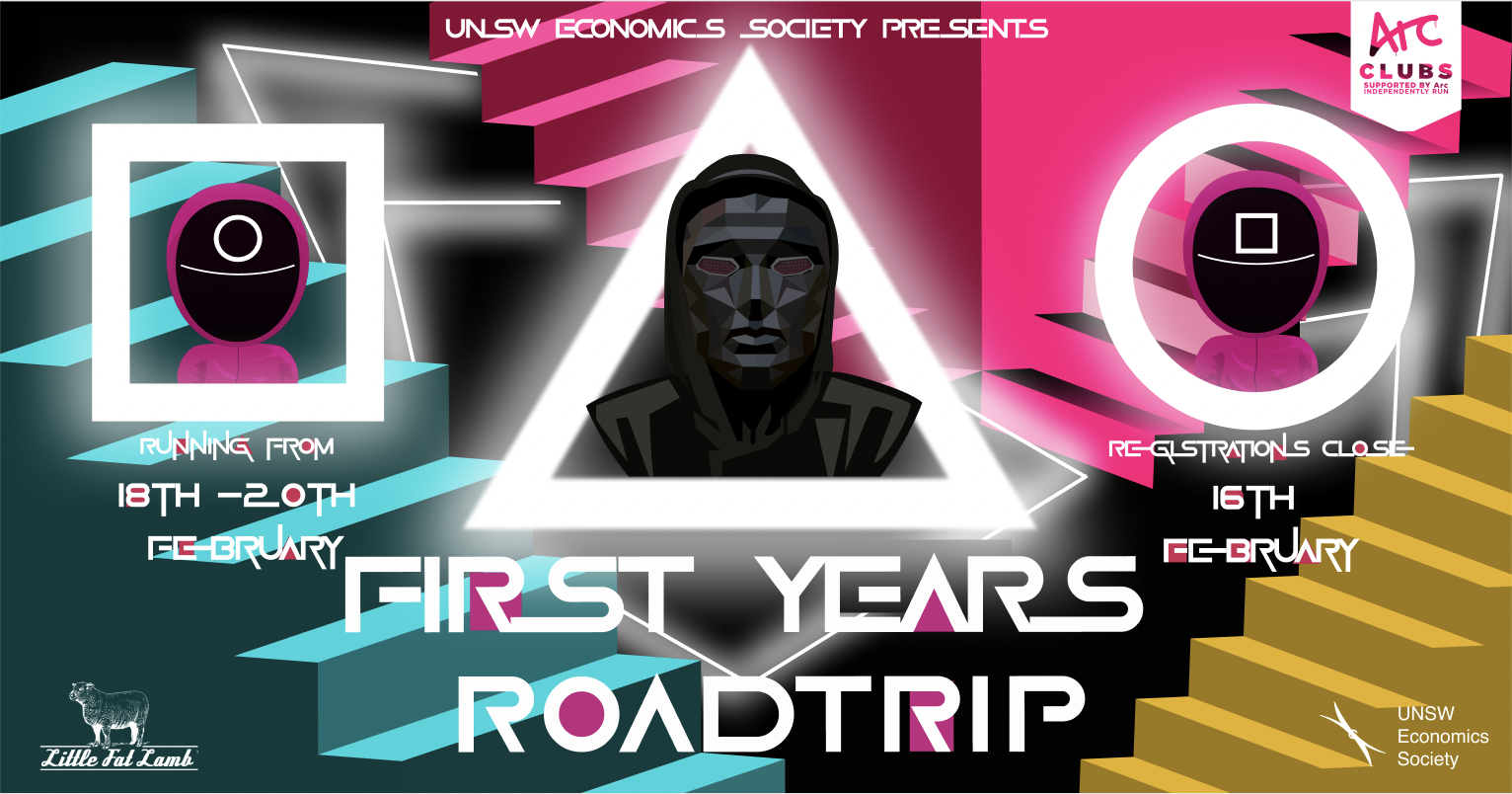
Planned and executed marketing campaigns for major social and educational events, collaborating with the events and communications teams to ensure cohesive branding and strong engagement. Created digital assets and promotional materials using Figma and Adobe Creative Suite, including event posters, social media graphics, and content calendars for both educational and corporate campaigns.
Target Audience
University students and the wider campus community interested in economics and education.
Platforms
Facebook, Instagram, LinkedIn, website blogs, and monthly newsletters
These were key digital platforms for engaging student communities with accessible educational content and a consistent digital presence.




Software & Tools

Visual Identity and Merchandise Design
Jersey Design – Local Sports Team
Designed a custom jersey for a sports team competing in an Oztag Social Cup tournament. Through client consultations and collaborative vision boarding, I shaped the creative direction to capture the team’s personality and ensure the final product aligned with their brand values and goals.
Target Audience
Social and university sports teams seeking apparel that balances performance with strong visual identity, helping them stand out and foster team cohesion.
Outcome
Achieved a production-ready design that balanced user needs, aesthetic appeal, and brand consistency—showcasing a collaborative, feedback-driven approach to problem-solving.
1.
Vision Boarding
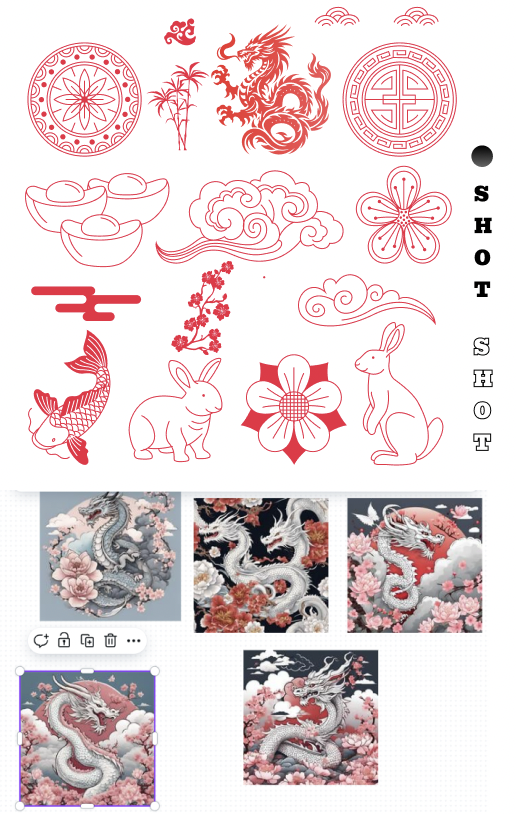
Ran collaborative sessions with the client to explore colours, motifs, and thematic directions that reflected the team’s identity.
2.
Sketches and Mockups

Developed initial grayscale sketches to refine layout, structure, and hierarchy before moving into color. Explored multiple mockups and pattern variations, iterating on placement and material choices based on feedback and review to establish a clear foundation for the final design.
3.
Design Iteration and Refinement

Refined artwork for production, incorporated feedback from clients, and approved print-ready files for manufacture. Feedback was incorporated throughout, leading to a final version approved for production.
Software & Tools
UI/UX Design
The following projects highlight the importance of user-centered front-end design in creating intuitive, accessible, and impactful solutions.
Drawn to the intersection of design and technology, and passionate about SaaS and digital experiences that put users first, through UI-UX, I explore how thoughtful design can streamline interaction and reduce friction in product interfaces.

EduSmart — UX Design Case Study
Developed under the Google UX Design Certificate Course
Problem Statement
A lack of transparency and personalization in online learning platforms often leaves users uncertain about course expectations and value. Clearer structure and tailored guidance can help learners more confident, informed choices.
Target Audience
- Students and lifelong who want to easily find courses that suit their preferences, learning goals, and desired outcomes.
- Educators and course providers aiming to connect with students whose needs and goals align with their teaching, and can commit, and benefit from the content.
Solution
EduSmart’s interface delivers structured, user-focused information and organizes course content intuitively. With clear navigation and personalized filtering, the platform improves transparency, reduces friction, and empowers users to engage confidently throughout their learning journey.
User Research

- Conducted interviews and surveys with students and course providers and collated responses into personas, journey maps and user stories and affinity maps to understand users’ needs and pain points.
- Insights indicated that users value course transparency, personalized recommendations, and easy navigation.
Wireframing
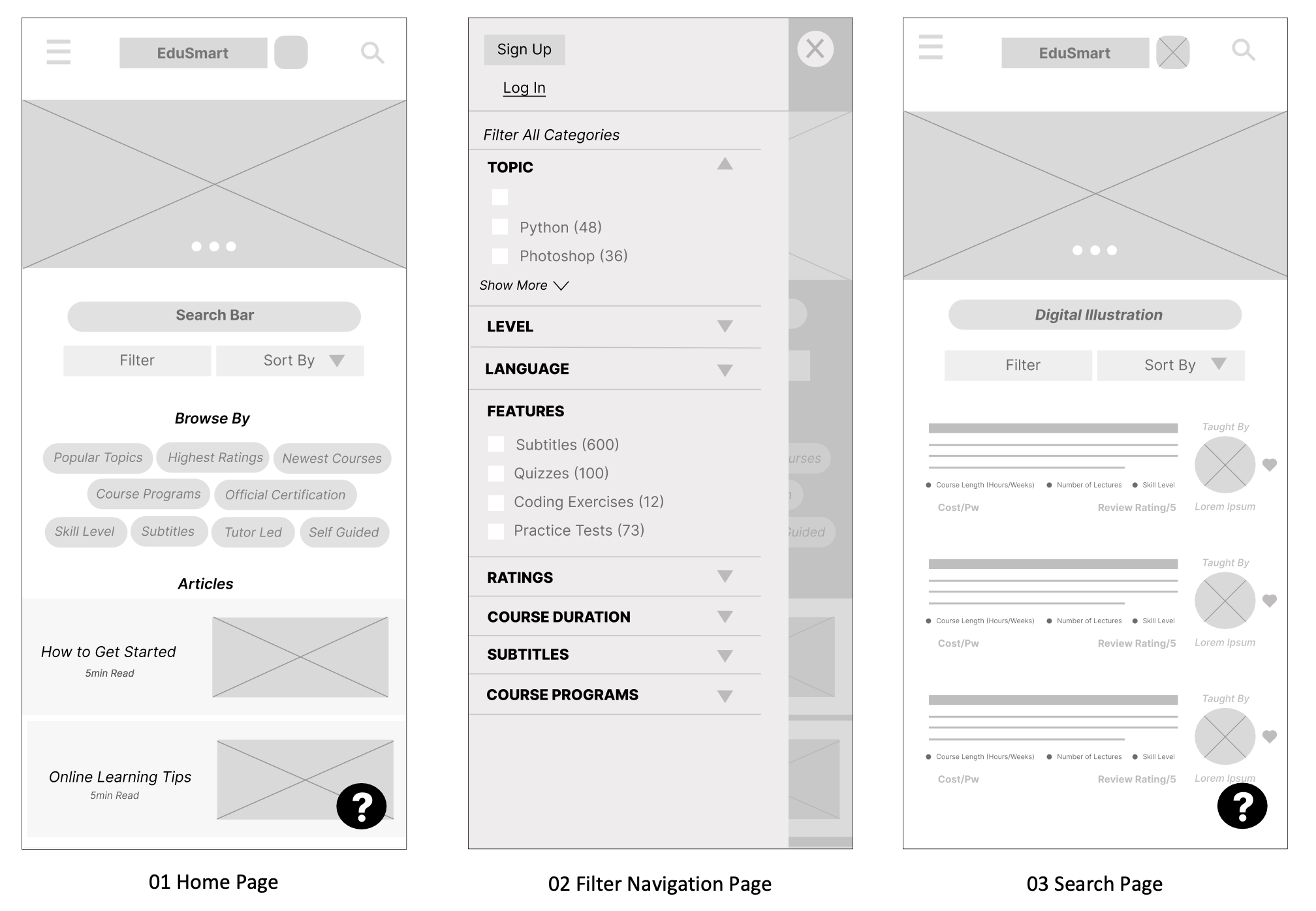
- Developed low-fidelity wireframes to explore layout, functionality, and flow, prioritising accessibility and ease of navigation for users at all stages of their learning journey.
- By matching demand with the right learners, the platform ensures students find the courses they’re looking for and educators reach those most likely to engage and benefit.
Mockups

- High-fidelity mockups and interactive prototypes were developed, demonstrating visual hierarchy, accessibility considerations, and user interactions.
- Key features under development include dynamic course filters, responsive navigation, and intuitive progress tracking.
Next Steps
- Conduct usability testing with learners and educators to validate design decisions.
- Iterate on wireframes and prototypes based on feedback.
- Finalize high-fidelity designs and handoff for implementation.
Software & Tools

UpTrack – UX Design Case Study
Problem Statement
Many project and learning management tools overwhelm users with cluttered interfaces and unintuitive workflows. Users often struggle to track deadlines, manage tasks, and organize projects efficiently, which creates friction and reduces engagement.
UpTrack aims to reduce this friction by providing a clear, intuitive platform for tracking projects, due dates, and learning progress.
Target Audience
Primary Users: Students and/or project managers who need to manage multiple projects, assignments, and deadlines effectively.
Secondary Users: Educators or mentors who want insight into progress and task completion to provide timely guidance.
Solution
The UpTrack interface is designed to give users a clear overview of their projects and deadlines, with intuitive navigation, customizable views, and interactive tracking features. The platform focuses on minimizing cognitive load and helping users stay organized, engaged, and motivated throughout their learning journey.
User Research
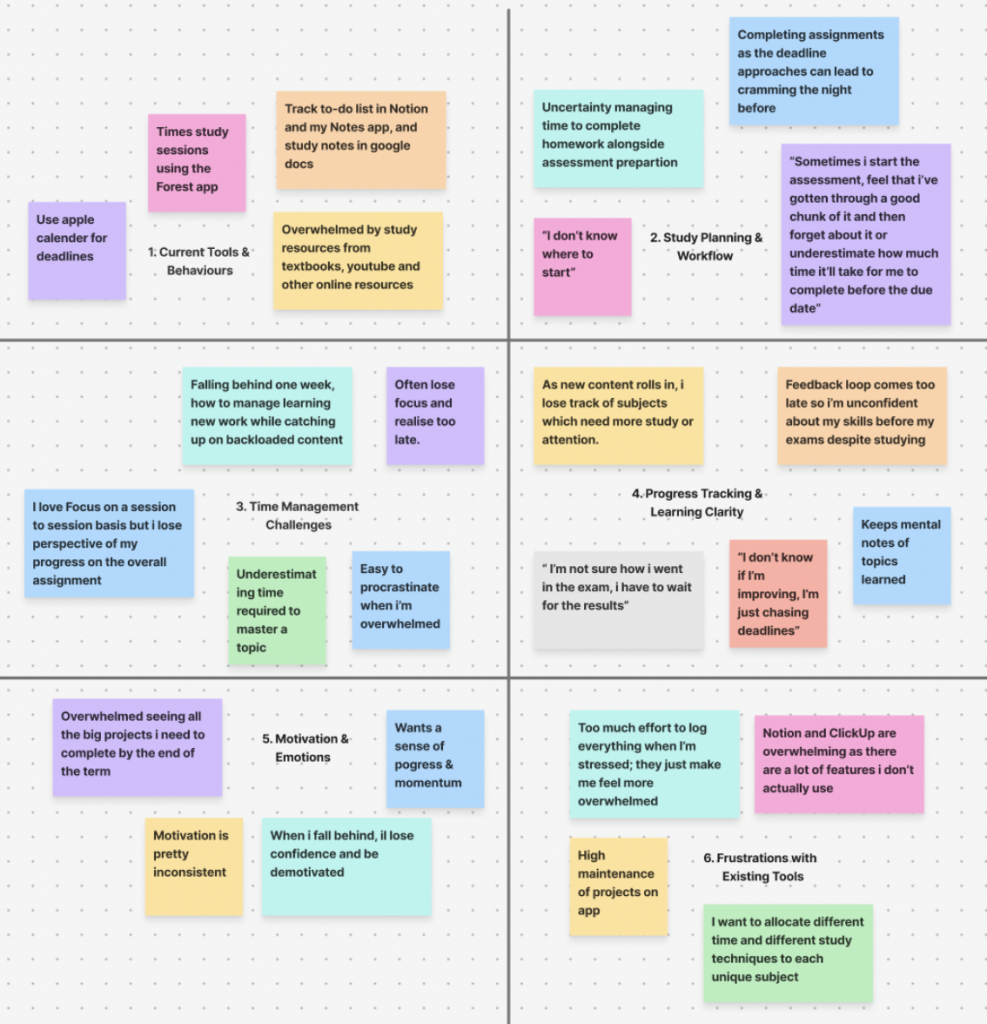
- Interviews and surveys with students to understand pain points in current project management workflows.
- Early insights show users value visual clarity, simple task tracking, and flexible organization options.
- Personas, user journey maps, and market research on competing remote project management tools guided the prioritization of key features and user needs.
Wireframing
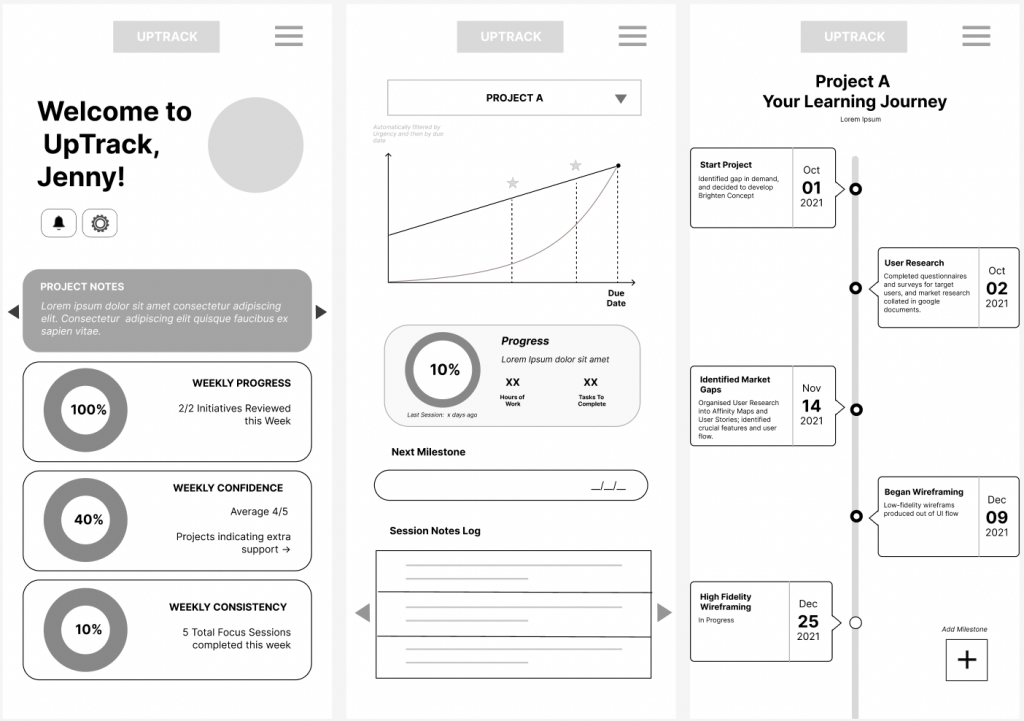
- Low Fidelity Wireframe sketches explored layouts for dashboards, task lists, and progress tracking.
- Iterative ideation focused on usability, hierarchy, and interaction flow, emphasizing consistency, clarity, and visual indicators to help users track progress and build confidence.
Mockups
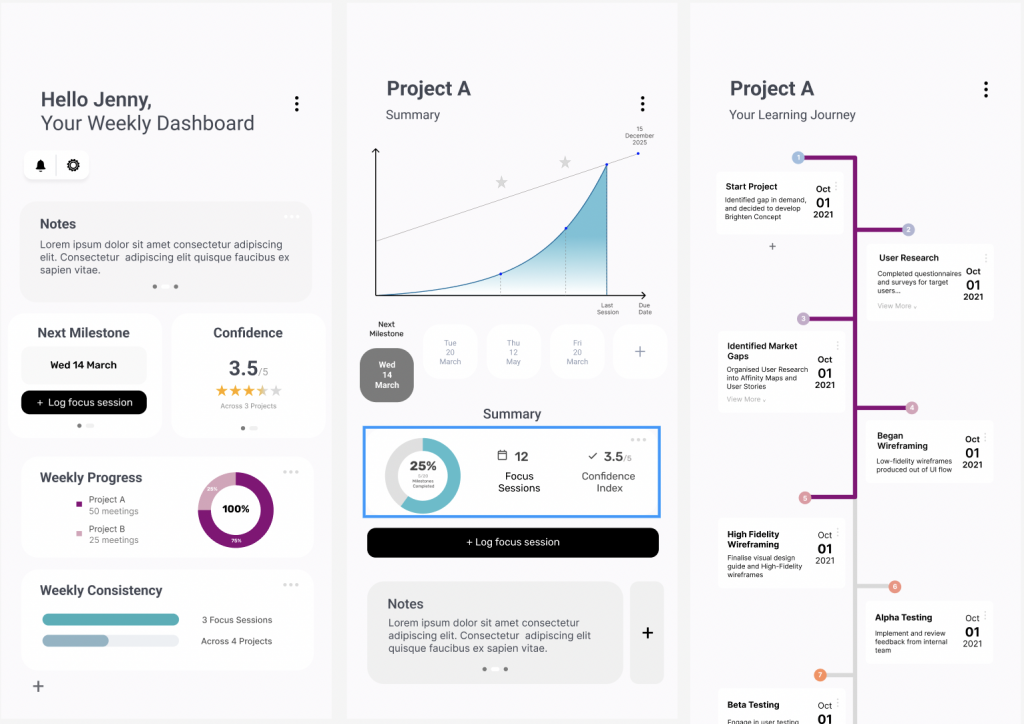
(In Progress)
- Key features under development include due date visualization, progress tracking, and intuitive project filtering.
Next Steps
- Finalise visual design elements for interface and furnish high fidelity prototypes
- Conduct usability testing with students and mentors to validate navigation and task interaction.
- Iterate on prototypes based on feedback.
- Refine visual design and prepare for a functional prototype/demo.
Software & Tools
Get in Touch!
I’m inspired by the ideas, work, and passions of others, and love connecting with fellow creatives. If you’re interested in collaborating or sharing your work, I’d love to hear from you!